Business, made simple.
Leads, messages, reviews, jobs and money, all on one screen. Arrange it your way, then just ask.
At the desk, on the tablet, in the truck.
Same canvas, same numbers. The layout reflows to fit, and the mic stays one tap away.
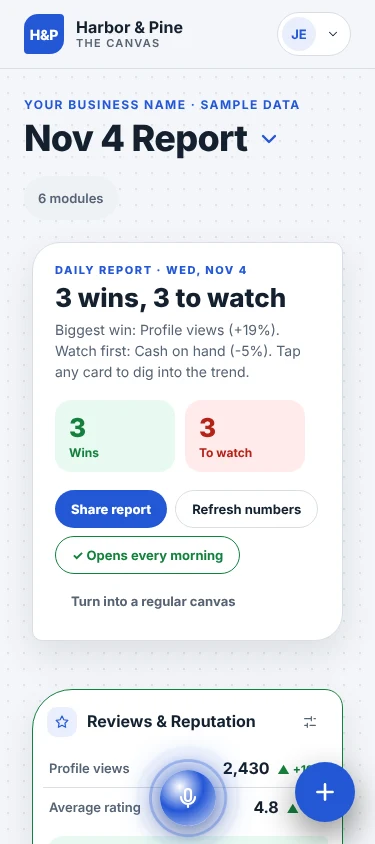
Three sign-ins light up most of the dashboard
Google covers your calendar, inbox, Business Profile and ads. Meta covers Facebook and Instagram. Add one money app and Finance fills in.
 Google Business Profile
 Google Calendar
 Gmail
 Outlook
 Meta Ads
 QuickBooks
 Stripe
 Square
 Xero
 Twilio
 Yelp
 Mailchimp
 Zapier
From sign-in to a full canvas in one sitting.
-
01
Sign in to your tools
Sign in with the accounts you already use. Your numbers flow in. Nothing posts or charges without asking.
-
02
Arrange your canvas
Drag modules where you want them; cards slide out of the way as you go. Pick a skin that fits your shop.
-
03
Run the day from it
Ask the mic what needs you. Send a quote, book a job or ask for a review in one tap, with a draft ready to go.
See your business on the canvas.
A 30-minute walkthrough on Google Meet. We connect your tools live and set up the modules that fit how you work.
- Pick any open time on the calendar
- Your Google Meet invite arrives by email right away
- No prep needed
Choose a day
{{bk.tzLabel}}Loading open times…
No open times this day. Try another day.
Your details
{{bk.formErrorText}}
You're booked.
{{bk.whenLabel}}
A Google Meet invite is on its way to {{bk.email}}.
Preview only: on the live site this books a real call on the calendar.